
Delete your Menular account
Deleting your account permanently removes your menus, bookmarks, and other saved data from Menular. Account deletion cannot be undone.
Recommended: Use the Menular App Delete Account Feature
Menular lets you delete your account directly in the app. This feature works for every account, whether you signed in or used Menular as a guest, and deletes your account and data immediately.
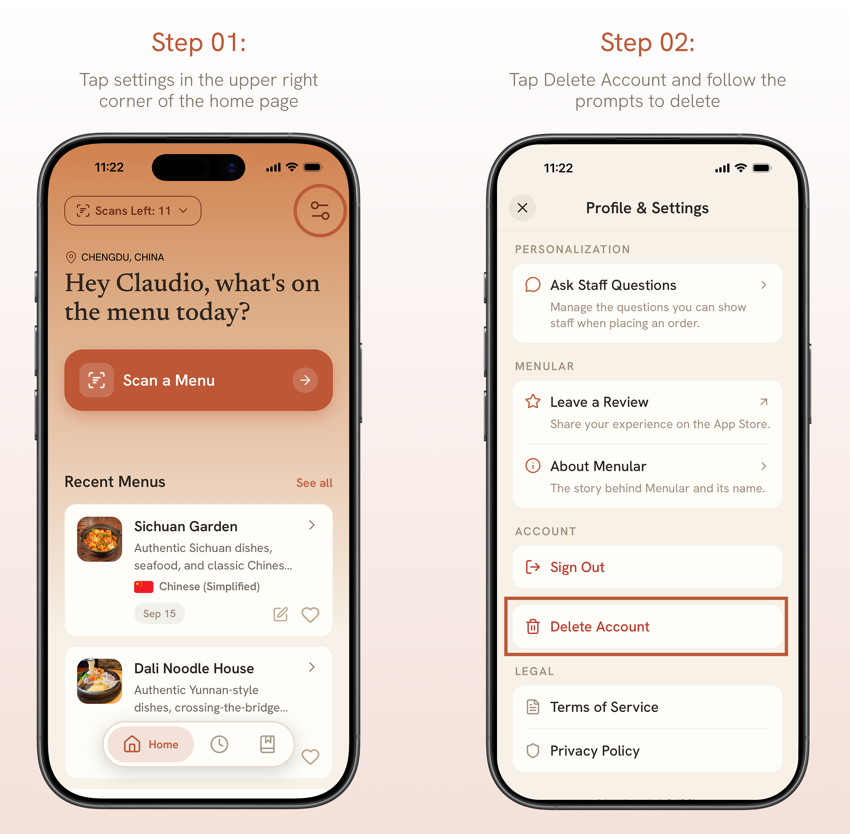
- Open Menular and tap the settings icon in the upper right corner of the Home screen.
- Tap Delete Account and follow the prompts to delete.
What gets deleted
- Your profile and preferences
- Your scanned and favorite menus
- Your bookmarks and Ask Staff questions
- Your scan history
- Any unused scans, active scan pass, or remaining bookmark capacity. These cannot be restored.
What we keep
- A record of past purchases, no longer linked to your account, kept for up to 7 years for tax and accounting.
- On Android, an anonymous free-scan counter. This counter only ensures each phone receives its five free scans once and is not linked to your account, name, or email.
See our Privacy Policy for details.
Request Account Deletion via Email
If you cannot use the app, you may request account deletion by email.
Please read before sending a request
- Email requests are available only for accounts that sign in with Google.
- Send your request from the Google email address you use to sign in to Menular. Requests from any other address are not accepted, to protect your account from deletion requests made by someone else.
- If you signed in with Apple, use the Delete Account feature in the Menular app on your iPhone.
- Guest accounts have no associated email address and cannot be identified, so they can only be deleted in the app.
What to expect after you send your request
We will reply to your Google email address to confirm the request. Your account is deleted only after you confirm, within 30 days of your confirmation. We will notify you by email once the deletion is complete. If anything prevents us from deleting your account, we will notify you by email.